How we find possibilities
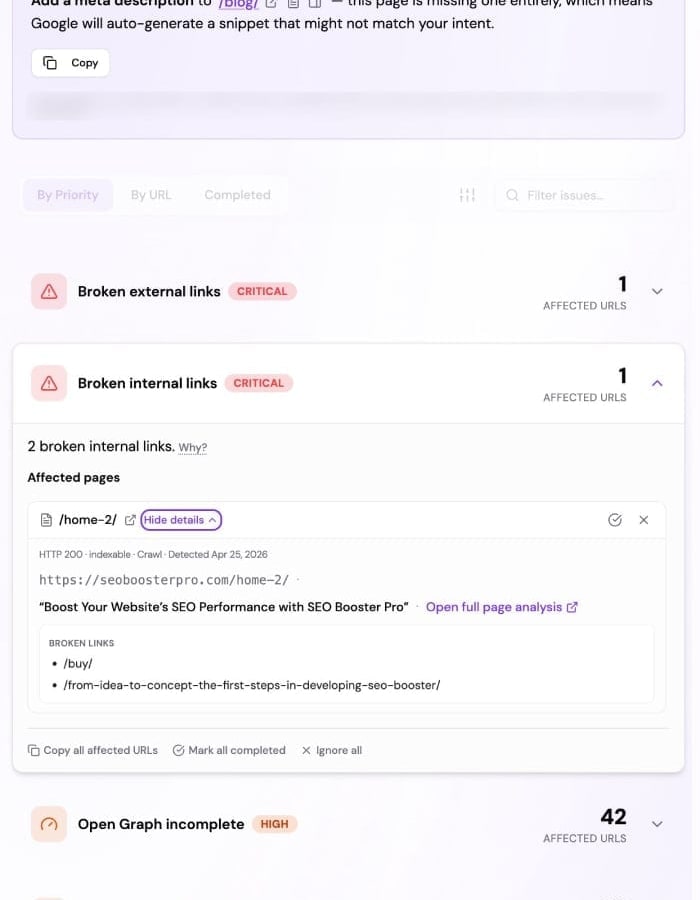
Possibilities are suggestions we attach to specific URLs so you can prioritize fixes and content improvements. They are not a manual checklist you fill in—our systems derive them while we crawl your site and, where the data exists, while we compare pages to stored Google Search Console performance.
In SEO Perception, a website is always tied to a Search Console property when you add it—you pick the property during setup (see Adding a website). Onboarding runs an initial Search Console ingestion attempt before the first crawl is seeded, so stored performance data is more likely to exist when we first evaluate pages (very new or low-traffic properties may still have little or no data in Google). So the question is not “GSC or no GSC,” but whether we have finished collecting and storing performance rows for a given URL and time range, and whether a suggestion needs that data at all.
Two ingredients: crawl and Search Console
From the crawl, we look at each page much like a search engine would at a high level: HTTP result, HTML content, metadata, links, images, and structured data. That powers technical and on-page style possibilities—titles, descriptions, headings, broken or redirected links, accessibility hints for images, and more. The categories are summarized in On-page and technical signals; the mechanics of crawling are described in How the crawler works. These can appear as soon as we have crawled the page. Separately, when robots.txt (or a common default path) exposes XML sitemaps, we can surface URLs listed there that do not return HTTP 200 on the first response—see Sitemap URLs and HTTP 200.
From Search Console, we use ingested performance facts for URLs that show up in both the crawl and your reports—for example which queries drive impressions and clicks to a page. That unlocks possibilities that depend on real search behavior (such as whether important queries are reflected in the page content or how snippets might relate to your titles and descriptions). What we can store and show over time depends on your plan; see Search Console data in SEO Perception.
If a URL has no matching stored performance data yet—for example collection is still catching up, or that URL rarely appears in Search—you will still see crawl-based possibilities where they apply. Ideas that explicitly need query or click context simply do not appear until the underlying GSC rows exist for that situation.
When possibilities appear or disappear
Possibilities are recalculated as we process pages and refresh data. Fixing an underlying problem on a later crawl can clear an item; you can also mark items resolved or ignored in the app where that workflow is available. The exact set of rules evolves as the product improves—it is not a fixed public checklist.
Where to work with them in the app
Use the dedicated SEO Possibilities page for the full list and filters (you can deep-link with ?websiteId=…). The shared project context bar lets you switch websites in place and jump between Details, SEO Possibilities, and PDF Report without leaving the workspace flow. For a visual walkthrough, see Project context bar.
The website Overview tab often surfaces a short summary with a link into the same list. For the surrounding screens, see What you see on a website.
If you need a shareable summary for clients or stakeholders, you can export a PDF from the same workflow. See Export PDF report (SEO Possibilities). For how one team used that export as both a human brief and an AI handoff, read SEO Report for Humans and AI (dansk).
Related articles
- What you see on a website
- Project context bar
- On-page and technical signals
- JSON-LD basics
- rel=author on editorial pages
- AI discoverability overview
- How the crawler works
- Sitemap URLs and HTTP 200
- Search Console data in SEO Perception
- Connecting Google Search Console
- Adding a website
- Tiers, pages, and data retention
- Plan features explained (comparison rows)